
Page speed is a growth lever, not a vanity metric in 2026. Here's why.
Most businesses treat page speed as a technical box to tick. It isn't. It's one of the few levers that quietly moves traffic, conversions, and search rankings at the same time, and unlike an ad budget, the gains compound and don't stop when you stop paying.
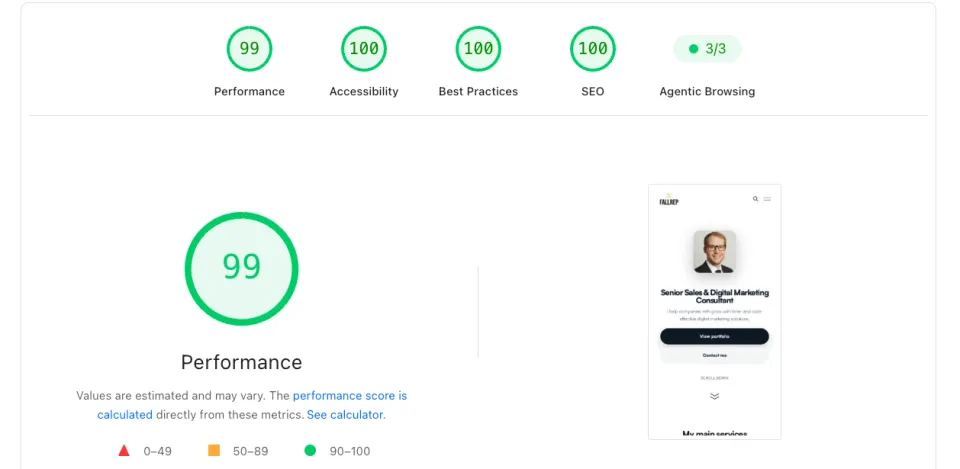
I'll make the case with numbers, explain exactly what Google measures (in plain English), and show you the playbook behind a near-perfect mobile score, using my own site as the worked example.
- 99 Performance,
- 100 Accessibility,
- 100 Best Practices,
- 100 SEO,
- and a perfect 3/3 on Google's newest check, Agentic Browsing.
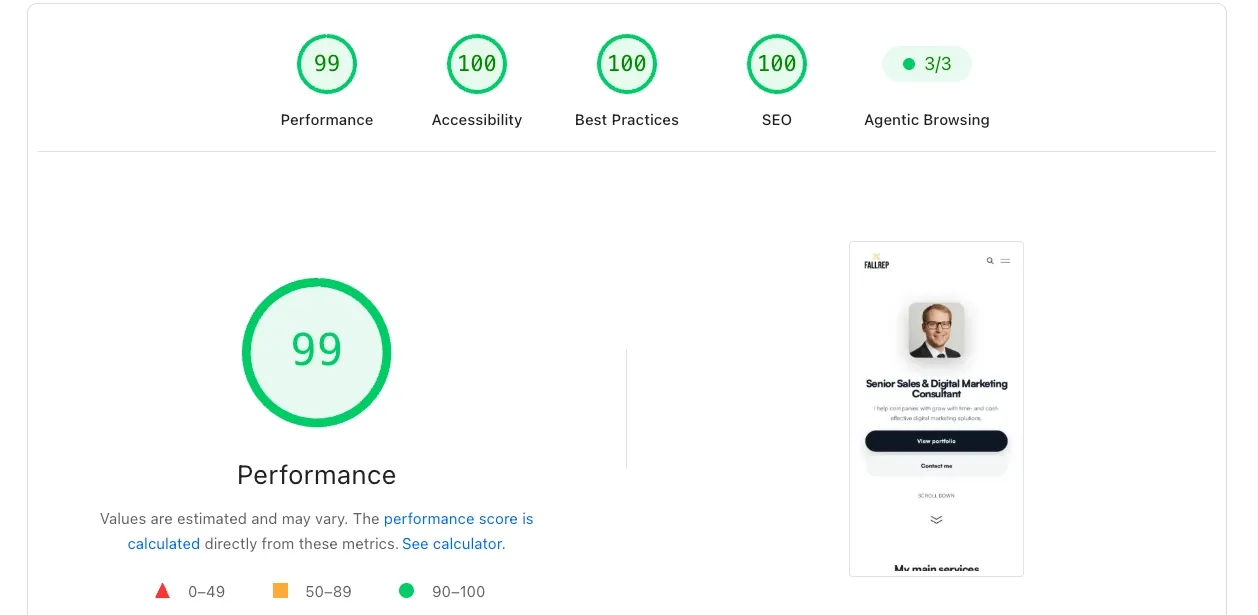
Mobile is the hard one: it simulates a mid-range phone on a throttled connection, which is where most sites fall apart. So let's talk about why that score is worth chasing, and how you get there.
Why speed is a money question
Google studied more than 900,000 mobile landing pages and found a brutal, linear relationship between load time and lost visitors: as a page goes from 1 second to 3 seconds, the probability that a mobile visitor bounces rises 32%. From 1 to 5 seconds, it's 90%. From 1 to 10 seconds, 123%.
Read that again with your own funnel in mind. Every visitor who bounces before the page renders is a click you already paid for, through ads, content, or SEO effort, evaporating before they ever saw your offer. Speed doesn't create demand, but slowness destroys demand you've already captured. That's why I treat it as a conversion-rate problem, not an engineering hobby.
It's also a ranking problem. Core Web Vitals are a confirmed Google ranking signal, and they're measured on real visitors to your site, not in a lab. Faster pages get seen by more people and convert more of the people who see them. Both ends of the funnel, one fix.
What Google actually measures
PageSpeed Insights blends two things people constantly confuse:
- Lab data (the Lighthouse scores): a single simulated load in a controlled environment. Great for diagnosing and iterating.
- Field data (Core Web Vitals): anonymized measurements from real Chrome users over the previous 28 days. This is what feeds the ranking signal.
A high lab score is the practice run; passing Core Web Vitals in the field is the actual game. You want both, and the lab score is how you get the field data to move.
At the heart of it are three Core Web Vitals, and they map neatly onto three questions a visitor asks without realizing it.
Largest Contentful Paint (LCP):
The time until the biggest thing on screen (usually your hero image or headline) is visible. Good is 2.5 seconds or less at the 75th percentile of your visitors.
Interaction to Next Paint (INP):
How quickly the page reacts when someone taps or clicks. INP replaced the older First Input Delay in 2024 because it measures every interaction, not just the first. Good is under 200 milliseconds, and it's the vital most sites fail, because it's driven by heavy JavaScript.
Cumulative Layout Shift (CLS):
Whether content jumps around as the page loads: the maddening moment you go to tap a button and an ad shoves it out from under your thumb. Good is under 0.1.
Pass all three for at least 75% of your real users and you've cleared the bar.
Miss any one and you're leaving both rankings and revenue on the table.
The playbook behind a near-perfect mobile score
A 99 on mobile isn't luck or an expensive plugin. It comes from a handful of disciplines applied consistently. Here's the shortlist that does most of the work:
Send fewer, smaller bytes. Modern image formats (WebP/AVIF), images sized to the space they actually occupy, and lazy-loading anything below the fold. Images are the single most common cause of a slow LCP, and also the easiest win.
Ship less JavaScript. Every kilobyte of JS has to be downloaded, parsed, and executed on the user's phone, and that's what wrecks INP. Cutting unused scripts, deferring non-critical ones, and avoiding heavy frameworks where plain HTML will do is the highest-leverage thing most sites ignore.
Reserve space for everything. Give images, embeds, and ads explicit dimensions so nothing reflows as it arrives. This is how you drive CLS to near zero, and it costs nothing but attention to detail.
Cache aggressively and serve from the edge. A CDN puts your assets physically closer to the visitor, and proper cache headers mean repeat visits are near-instant. Time-to-first-byte is the foundation everything else is built on.
Load fonts without blocking. Use font-display: swap and preload your primary font so text is readable immediately instead of hiding behind an invisible-text delay.
Respect the critical path. Inline the CSS needed for what's visible first, and let the rest load after. The goal is simple: paint something useful before the visitor's patience runs out.
None of these are exotic. The difference between a 70 and a 99 is rarely one clever trick; it's doing all of the boring things properly and never letting a "quick" third-party script quietly undo them.
The new frontier is that your site is being graded for AI agents too
Notice the fifth item in that screenshot: Agentic Browsing, 3/3. This is Google's newest addition to PageSpeed Insights (and frankly still experimental), and it's a preview of where the web might be heading rather than an established standard. Instead of scoring how fast a page is for a human, it asks whether an AI agent, the kind that increasingly books, buys, and researches on a person's behalf, could understand and operate your site.
It's deliberately not a 0 to 100 score yet; the standards are still forming, so Google reports a simple ratio. The three checks it runs are:
- A clean accessibility tree: are your buttons, links, and fields named and structured so a machine can tell what they do? (Good accessibility for screen-reader users turns out to be good accessibility for agents, too.)
- Layout stability: the same CLS idea, because an agent can't reliably click the right element on a page that keeps moving.
- An
llms.txtfile: a proposed convention (not an official standard, and not something search engines act on today) for a short markdown file at your domain root that would point AI systems at your most useful content, in the spirit of whatrobots.txtdid for search crawlers.
A caveat worth being upfront about: this is a look ahead, not a fire drill. Agentic Browsing is experimental, llms.txt is a proposal rather than a ratified standard, and nothing about your Google ranking depends on it today. So treat it as a cheap, genuinely fun experiment. Two of the three checks, a machine-readable accessibility tree and a stable layout, are just good engineering you should be doing for human visitors anyway, so you get them for free. The third, llms.txt, takes ten minutes to add and costs nothing, and it's an interesting way to learn how an agent-driven web might actually work. If AI assistants do become a real discovery channel, you're already set up; if the idea fizzles or the spec changes, you've lost nothing. That's the kind of low-downside experiment worth running early, as much to understand it as to benefit from it.
Your five-minute self-check
- Run your own homepage through PageSpeed Insights, and read the field-data section first, because that's what Google actually ranks on (start with mobile!)
- Note which of LCP, INP, or CLS is failing. That tells you the category of problem: LCP points to images and hosting, INP to JavaScript, CLS to missing dimensions.
- Fix the single biggest image on your hero. It's usually the fastest measurable win.
- Audit third-party scripts (chat widgets, trackers, embeds). Remove or defer anything not earning its weight.
- Re-test, and remember the field data updates over 28 days, so real-user numbers move gradually. Give it time.
The bottom line
Speed is one of the rare improvements that helps rankings, conversions, and user trust simultaneously, and it keeps paying long after the work is done. A near-perfect score isn't the goal in itself; it's the visible proof of a site that respects its visitors' time and their phones' limits. Do that consistently, and both Google and your customers reward you for it.
Want to know what's slowing your site down, and what it's costing you? I help companies turn technical performance into measurable growth. Get in touch.
Further reading
- Core Web Vitals thresholds and definitions: web.dev
- Largest Contentful Paint: web.dev/lcp
- "Milliseconds Make Millions" and the mobile bounce data: Think with Google